logo
สินค้า
อ้างอิง
สินค้า
ผลิตภัณฑ์
ผลิตภัณฑ์
บ้าน > ผลิตภัณฑ์ > บอร์ดหลักเครื่องพิมพ์ > 6LL23664000 6LL234Z6300 PWB-H- MAIN-154N for Toshiba 2303 2309 2323 2809 Printer Copier part
การติดเชื้อ
ติดต่อ
ติดต่อ: Mr. Jessie
แฟ็กซ์: 86-0757-86771039
ติดต่อตอนนี้
โทรหาเรา

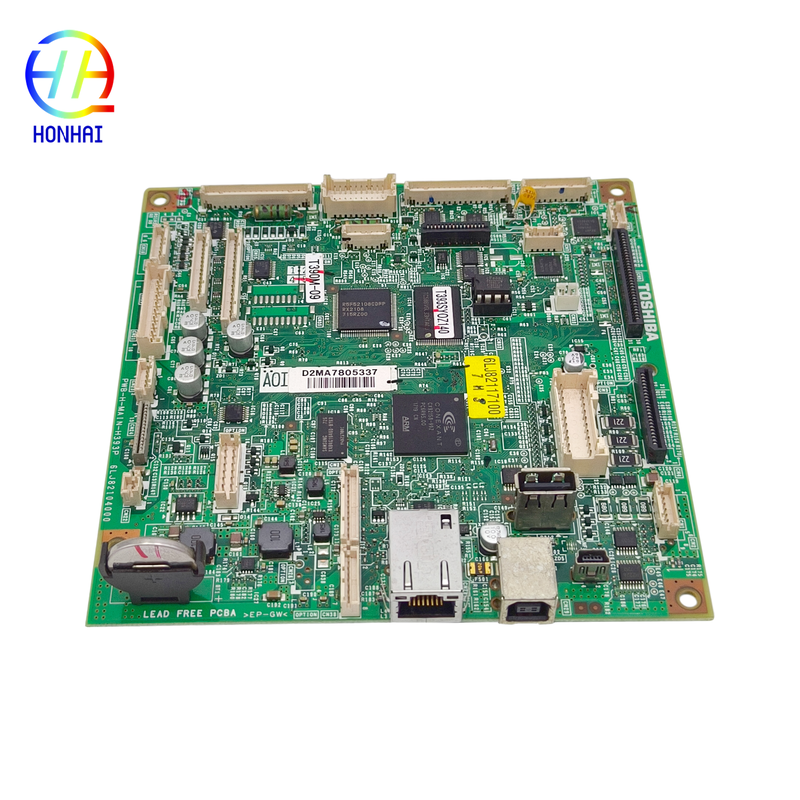
6LL23664000 6LL234Z6300 PWB-H- MAIN-154N for Toshiba 2303 2309 2323 2809 Printer Copier part

รายละเอียดสินค้า

ชื่อแบรนด์: Epson

หมายเลขรุ่น: แอล850 แอล810

เงื่อนไขการชําระเงินและการจัดส่ง

จำนวนสั่งซื้อขั้นต่ำ: 10

รายละเอียดการบรรจุ: บรรจุเป็นกลาง

เวลาการส่งมอบ: 3-7 วันทำการ

เงื่อนไขการชำระเงิน: ที/ที, เวสเทิร์นยูเนี่ยน

สามารถในการผลิต: 1,000 ชิ้น/เดือน

หา ราคา ที่ ดี ที่สุด
เน้น:

Toshiba printer mainboard replacement

,

Toshiba 2303 copier mainboard

,

PWB-H-MAIN-154N mainboard for Toshiba

6LL23664000 6LL234Z6300 PWB-H- MAIN-154N for Toshiba 2303 2309 2323 2809 Printer Copier part

The main logic board is the primary processing unit in your Toshiba multifunction printer. It interprets print commands, controls system functions, and manages all connections to other hardware devices. Your Toshiba 2303, 2309, 2323, or 2809 may have very serious issues if it is failing to turn on, has a blank/frozen display, is frequently crashing, has difficulty communicating with the USB/network, or has unexplained problems with its i/o ports. The main logic board is likely responsible for most of these issues. The PWB-H-MAIN-154N has been manufactured using the same quality and design standards as original equipment manufacturers (OEM) mainboards, which guarantees it will work without issues and perform dependably. Replacing a bad main logic board with an OEM main logic board is an excellent way to protect your company from wasting money on an entire printer if the only issue is that it needs a new main logic board, and extending the useful life of your office equipment by keeping it operating longer and avoiding significant expenditures due to downtime.

6LL23664000 6LL234Z6300  PWB-H- MAIN-154N for Toshiba 2303 2309 2323 2809 Printer Copier  part 0

6LL23664000 6LL234Z6300  PWB-H- MAIN-154N for Toshiba 2303 2309 2323 2809 Printer Copier  part 1

6LL23664000 6LL234Z6300  PWB-H- MAIN-154N for Toshiba 2303 2309 2323 2809 Printer Copier  part 2

 Important Usage & Installation Instructions
Pre-Installation Preparation
  1. Power Off & Unplug: Before attempting any repairs, completely turn off the printer and unplug the power cord from the electrical outlet to prevent damage to the electronic components.
  2. Verify Part Numbers: Carefully check the part numbers printed on your original faulty mainboard (e.g., 6LL23664000 or PWB-H-MAIN-154N) to ensure they perfectly match the replacement board you are about to install.
  3. Static Electricity Protection: Mainboards are highly sensitive to static electricity. It is highly recommended to wear an anti-static wrist strap or touch a grounded metal object before handling the board to prevent electrostatic discharge (ESD) damage.
Installation Steps
  1. Access the Mainboard: Open the printer's side or rear service cover to locate the main logic board. You may need to remove specific screws or plastic casings depending on your specific model (2303/2323 series).
  2. Document Connections: Before disconnecting anything, take clear photos of all cable connections, ribbon cables, and wire harnesses attached to the old board. This will serve as a crucial reference during reassembly.
  3. Remove the Old Board: Gently unplug all connectors. Be careful with the locking mechanisms on ribbon cable connectors. Unscrew and carefully remove the old mainboard.
  4. Install the New Board: Place the new PWB-H-MAIN-154N board into the chassis and secure it with the screws. Reconnect all cables and harnesses exactly as they were on the old board, ensuring every connector is firmly seated.
  5. Reassemble: Replace any covers or casings you removed and close the printer.
Post-Installation Testing
  1. Power On & Initialize: Plug the printer back in and turn it on. The machine may take a little longer than usual to boot up for the first time as it initializes the new system board.
  2. Configuration Check: If your printer requires specific network settings (IP address) or custom system configurations, you may need to re-enter them via the control panel.
  3. Functionality Test: Print a test page, run a copy job, and test the scanner to ensure all core functions are operating smoothly without error codes.

Note: Mainboard replacement requires a certain level of technical skill. If you are not familiar with printer hardware repairs, we strongly recommend having the installation performed by a qualified technician to avoid accidental damage to your device.

ผลิตภัณฑ์คล้ายกัน